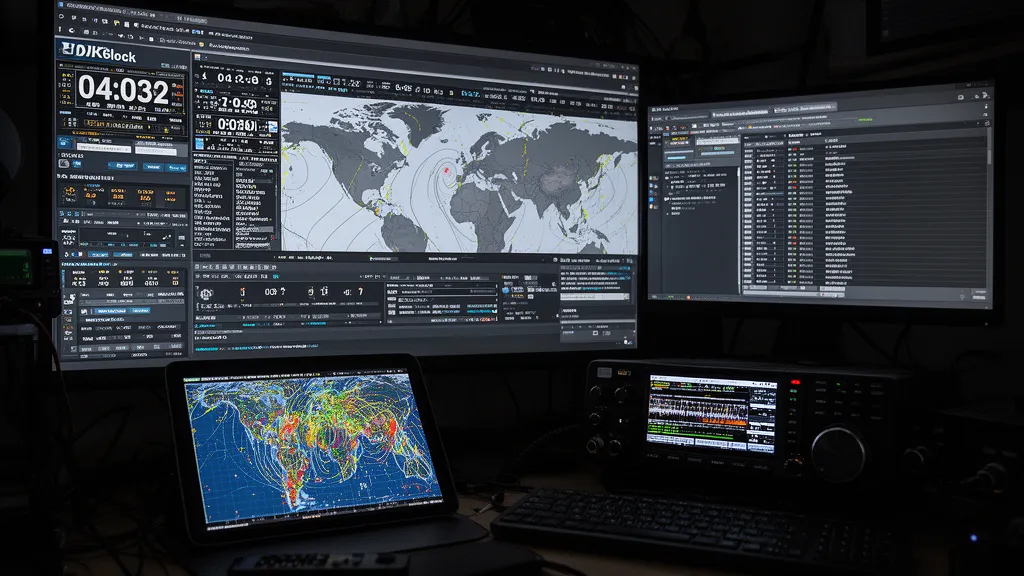
Operator’s Verdict: HamClock’s official backend was announced to go offline in June 2026 following the passing of its creator, Elwood Downey WB0OEW — unmodified HamClocks stop receiving data. If you want to keep the classic shack display, repoint your HamClock at the community backend or switch to OpenHamClock, the open-source successor. For solar weather depth and propagation planning in a browser, use DXRadar; for logging integration, DXView/DXLab Suite. Most stations still run more than one of these.
What Operators Want from Shack Tools
Radio shack tools serve different purposes, and the “best” tool depends on what problem you’re solving:
- Shack display — always-on monitor showing UTC time, band conditions, DX activity
- Pre-session planning — deciding what band to operate before turning on the radio
- Live assistance — checking conditions and DX activity while actively operating
- Logging integration — callsign lookup, DXCC status, beam heading during a QSO
Different tools excel at different positions in this list. HamClock is primarily #1; DXRadar primarily #2 and #3; DXLab Suite and HRD primarily #4.
HamClock in Depth
HamClock end-of-life (updated July 2026): HamClock’s creator, Elwood Downey (WB0OEW), became a silent key in January 2026. Version 4.22 is the final release, and the project’s farewell message stated that all HamClocks would cease to function when the official backend goes offline in June 2026 (Ham Weekly). An earlier version of this article said existing installations would continue to work — that was wrong: without the backend, stock HamClocks stop receiving data. The community fixes below are the way forward.
HamClock’s core features:
Grey-line display: The solar terminator shown on the world map is HamClock’s signature feature. The grey line marks the boundary between day and night. Propagation is often enhanced along the grey line — the mix of D-layer dissipation on the night side and maintained F layer produces enhanced paths. Operators who schedule grey-line DX contacts value seeing this in real time.
UTC clock: Prominent UTC digital clock. This sounds trivial but is genuinely valuable in a shack — contest exchanges, log times, and band-opening windows all require UTC. A visible, accurate UTC clock reduces errors.
DX spot arcs: Cluster spots shown as great-circle arcs on the world map. The arcs represent active DX paths in real time.
Beam heading: When you click a station on the map, HamClock calculates the beam heading from your grid square. This is useful for antenna rotator pointing.
DXCC reference: Shows whether a spot is a new DXCC entity for your log (if you configure your entities).
After the Shutdown: OpenHamClock and the Community Backend
Existing HamClock owners have two working paths since the June 2026 backend shutdown date, both community-built.
Keep your HamClock alive on the community backend. A community-operated replacement backend server was stood up specifically so existing HamClock installations can keep pulling data past the official shutdown. Repointing your HamClock at it is a configuration change, not a reinstall — see the walkthrough at Ham Radio Therapy. If your display went stale in June, this is the fastest fix and keeps the hardware you already have on the wall.
Switch to OpenHamClock. OpenHamClock is an open-source project started after Elwood’s passing to carry the HamClock concept forward — the same always-on shack-display format (world map, grey line, spots, solar data), rebuilt as a web application that runs in a browser, including on a Raspberry Pi driving a monitor. Development is community-driven and moving quickly, so check the project’s GitHub for the current feature set rather than relying on any snapshot written here.
Neither option requires abandoning the dedicated-display workflow. The practical question is whether you want to preserve the original software on borrowed time (community backend) or move to the actively developed successor (OpenHamClock). For a new build in 2026, OpenHamClock is the safer bet; for a working Pi you don’t want to touch, the community backend gets you running again today.
A third path needs no install at all: DXRadar’s shack display mode turns any browser-connected monitor into a fullscreen shack panel — big UTC clock, live propagation map, grey-line countdown, and band conditions — with the solar-weather depth (aurora, X-ray flux, solar wind) that HamClock never showed.
DXRadar as Operating Dashboard
DXRadar’s strength is the integration of propagation observation with space weather causation:
Why is 15m quiet? Check the X-ray flux — was there a flare? Check Kp — is there a storm? Check the propagation map — are there spots elsewhere confirming the band is open but there’s no DX activity in your region?
HamClock doesn’t answer “why” questions — it shows you what’s happening (spots, conditions) but not the space weather causes.
Aurora prediction: DXRadar’s aurora dashboard shows the predicted aurora oval, Bz, solar wind speed — none of which are in HamClock.
POTA activators: For operators who chase POTA, DXRadar integrates the activator map. HamClock doesn’t include POTA data.
Other Alternatives Worth Knowing
DXLab Suite (DXView, SpotCollector): A comprehensive Windows-based suite integrating callsign lookup, cluster spots, world map, logging, and rig control. Best for operators who want everything in one integrated Windows application. DXView shows DX spots on a world map; SpotCollector manages cluster feeds and filtering. Free but Windows-only.
MacLoggerDX: macOS-native application combining logging, cluster map, rig control, and callsign lookup. The best choice for macOS operators who want integrated logging with propagation map.
Ham Radio Deluxe (HRD): Commercial Windows suite with map, logging, and rig control. Subscription-based.
Globe (N8MH): A 3D rotating Earth with solar terminator and DX cluster arcs. More visual than HamClock’s 2D projection; popular as a supplementary display.
Practical Combinations
Many operators run multiple tools simultaneously:
- OpenHamClock (or HamClock on the community backend) on a dedicated Raspberry Pi monitor → always-on shack display with UTC, grey line, DX arcs
- DXRadar on laptop or tablet → pre-session planning and solar weather monitoring
- DXLab SpotCollector on operating PC → integrated with logging software for in-QSO callsign lookup
These tools complement rather than replace each other. The overlap in “DX spots on map” functionality is genuine, but the differences in use case (always-on display vs. planning dashboard vs. logging integration) mean that combining them serves operators better than trying to find a single tool that does everything.
Frequently Asked Questions
What is HamClock?
HamClock is a free amateur radio clock and operating aid software created by Elwood Downey (WB0OEW). Note: the project has ended — Elwood Downey became a silent key in January 2026, version 4.22 is the final release, and the official backend was announced to go offline in June 2026, after which unmodified HamClocks stop receiving data. It displays UTC time prominently alongside a world map with the grey line (solar terminator), Maidenhead grid squares, current DX cluster spots as arc lines on the map, geomagnetic conditions, and various solar indices. HamClock runs on Linux/Raspberry Pi (a popular shack display application), macOS, Windows, and in a web browser. It is particularly popular with operators who want a dedicated shack display showing UTC time, grey-line position, and current DX activity simultaneously on a Raspberry Pi with a monitor.
What are the main HamClock alternatives?
Main alternatives to HamClock for radio shack displays and propagation monitoring: (1) OpenHamClock — the community-built open-source successor started after Elwood Downey’s passing, recreating the shack-display concept as a web app. (2) DXRadar — web-based, live propagation map, solar weather, aurora, POTA; better for solar weather depth. (3) DXView (part of DXLab Suite) — integrated with logging software, shows DX spots on world map within a full station management suite. (4) MacLoggerDX — macOS-specific, integrates map, logging, and rig control. (5) Ham Radio Deluxe Map — part of HRD suite, Windows-based. (6) Globe program (N8MH) — real-time 3D globe with solar terminator and DX spots. A community-run replacement backend also lets existing HamClock installations keep working.
What does HamClock show that DXRadar doesn’t?
HamClock’s primary differentiation is its integration of UTC clock display, grey-line visualisation, and DX spots in a shack-display-optimised format designed to run full-screen on a dedicated monitor. It shows the real-time solar terminator (grey line) on the world map, which is particularly useful for grey-line DX operations. HamClock also shows DXCC prefix reference data, beam headings from your location, and optional satellite tracking — features DXRadar does not have. DXRadar counters with deeper solar weather data (aurora dashboard, X-ray flux, solar wind), its own grey-line tool, and a fullscreen shack display mode with a prominent UTC clock for dedicated monitors.
Will my HamClock stop working?
Unmodified HamClocks were announced to stop functioning when the official backend goes offline in June 2026 — version 4.22 is the final release and no further updates are issued. Two community fixes exist: a community-operated replacement backend that existing installations can be repointed to, and OpenHamClock, an open-source successor project. If your HamClock display has gone blank or stale, those are the two paths back.
Can I run HamClock on a Raspberry Pi?
Yes — HamClock on Raspberry Pi is one of its most popular use cases. The program is available as a compiled binary for Raspberry Pi (ARM architecture, Raspbian OS) and can run in a fullscreen mode that turns an attached display into a dedicated shack status panel showing UTC time, world map with grey line, and DX cluster activity. A Raspberry Pi 3 or 4 with a 7-inch touchscreen or a connected TV is a common HamClock deployment. The web browser version of HamClock can alternatively be used on any connected display through a browser. Since the June 2026 backend shutdown date, a HamClock install must be pointed at the community replacement backend to receive data — or use OpenHamClock, which also runs on a Pi.
Is DXRadar usable as a shack display?
Yes — DXRadar has a dedicated shack display mode: open the live dashboard with the ‘Shack display mode’ button (or go directly to /ham-radio-propagation?display=shack) for a fullscreen layout with a prominent UTC clock, the live propagation map, grey-line countdown, and band conditions, designed to be readable from across the room on a dedicated monitor or a Raspberry Pi driving a browser. It requires no install and no backend of your own. DXRadar also works as an active-use planning tool on a laptop or tablet during operating sessions.